Monday, 2 May 2011

Eken M009S (MID) Android Tablet

OK, let's start by saying the Eken is no match for an iPad or a Samsung Galaxy Tab.

I paid £80 for mine, when Galaxys are £250-300 and iPads another £100 more, so my expectations weren't of comparability, I'm smart enough to know you don't get Ferrari performance for Nissan Micra money, but I had certain requirements for my Android tablet.

I picked the M009S for 3 reasons.

1. It was cheap for an Android 2.2 Tablet.
2. It had a 7" screen, which is a format I like, about the size of a paperback book.
3. I wanted it to read Zinio Publications and Kindle eBooks on, whilst allowing me to check emails, facebook updates and surf the net when the mood took me.

As I said, I only paid £80 for this and my initial impressions weren't bad on receiving it.

It's fairly flimsy and plastic feeling compared to an iPad or a Galaxy and the buttons have a cheap 'click' to them, rather an nicely cushioned feel, but it doesn't look or feel likely to break. Good value, at first sight, for £80.

I powered it up and found another cost-cutting point. The screen requires a solid push on it to react, unlike that on my HTC Desire phone or costlier tablets.

There's none of the swishing through through lists with a gentle brush of the finger, but it works ok.


The screen is a little muted in vividness too and only has 800x480 resolution. Stand alone, it doesn't look bad at all, but it doesn't compare side by side with the HTC Desire's lovely screen.

There are a couple of small speaker on the lower edge (when held in portrait mode), along with a power in socket, audio out socket, a slot for a Micro SD card and a longer slot which is allows fitting of a provided adaptor with two USB ports and an ethernet socket.


At the other end, there's a power on/off button and a "Menu" button and volume control on the right hand edge.


There's a button on the bottom front face, which works as a 'Back' button.

My first big disappointment came when trying to find my favourite Apps (as used on my HTC Desire) on the 'Android Marketplace'.

The included Marketplace was most definitely NOT Google and the vast majority of Apps I wanted were not included. Worse still, most of the Apps on the marketplace were in Chinese, rather less than useful to me...

Worse still, even installing many apps that work fine on my phone manually, they refused to work with the Eken's firmware out of the box.

Most importantly, neither Kindle or Zinio would connect to my accounts, even though I got them installed.

As a basic e-reader/media player/web browser it worked OK, but that's not what I'd bought it for and I was beginning to feel I'd bought a dud and was on the verge of sticking it on eBay for £50.

That I have persevered and have writen this review is testament to the efforts of Roger Calver on the Slatedroid.com forum.

Through searches I found his excellent Vestinious M009s Firmware which provides a whole new OS setup for the M009S.

There are risks in 'Flashing ROM', but I found the Vestinious 1.1.5 ROM worked flawlessly and I was able to restart my tablet with this OS installed in about 15 minutes of downloading it.

This transformed the device.

There's a Google Market (although, oddly, it seems to be missing some of the Apps I can find on the market on my phone, something I'm stumped about at the moment) with nearly all the apps you could want.
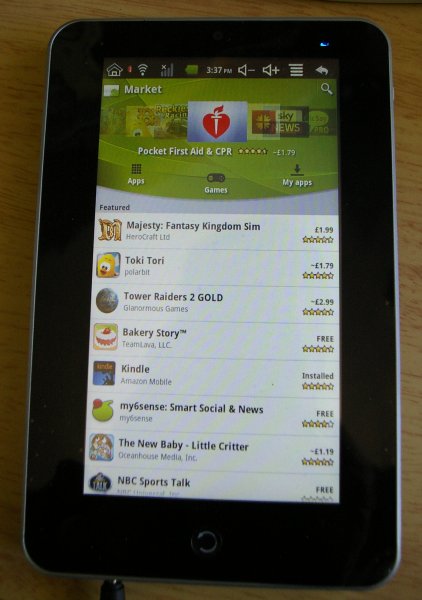


I quickly got most of my favourite apps installed, like Astro, Advanced Task Killer, Facebook, Better Keyboard 8, etc and set to work installing Zinio on it.


There is no Marketplace Zinio App yet, but some enterprising soul had pulled it off a Samsung (or other tablet it's bundled with) and posted it online. I'd had it working on phone for some weeks, with a few minor niggles.


It installed easily (even with the original Firmware), but with Vestinious I was able to connect to my Zinio account and download my magazines.


They read fine and a problem that I have on the HTC with the app crashing when switching orientation hasn't appeared on the Eken/Mid.


The 7" screen's a bit tight for reading on with my eyesight, but the neat TEXT option in Zinio lets me read the words in a text only form if the light is poor and I'll live with that for the convenience of the 7" format over the iPad's 10", which I'm sure would be easier to read.


I also put Kindle on, but initially couldn't get it to offer to register the device. I put this down to some problem with having a hard wired ethernet connection (using the adaptor) as once I disconnected that I was able to reinstall Kindle and was immediately offered a login.

Once this was done, the device appeared in "Manage Your Kindle" on the Amazon website and I was able to download all the books I'd got to the M009S.


The reader app works fine here and it even seems to remember where I am in a book between the HTC and the Eken which is rather a neat feature.

So, I now have a usable, valuable, functional Android Tablet for £80 and some time and effort.


I still have some minor issues with it, beyond those I mentioned previously.

At the moment it won't connect to the wi-fi hotspot on my HTC handset as that is an 'Ad-Hoc' network apparently (I believe this isn't too hard to put right) and the battery life is pretty poor (I reckon I get about 3 to 3 and a half hours from a charge reading magazines, considerably less with the wi-fi on) - EDIT : I did later get it work on the wi-fi on my HTC with no issues and it works well with my Mi-Fi from Orange.

I also can't get any barcode scanner software to work so far, but that's not too much of a problem.

If running BBC iPlayer is important to you, I wouldn't recommend this tablet. It runs, but it's like a series of stills rather than a flowing video. Odd, as it has no problem running AVIs at all, which look and sound pretty decent - So, it's pretty good if you want a stand alone media player.

I suspect the problem is the processor's a bit slow as it takes a few moments to switch orientation too.


Also, as you'd probably expect of a device this cheap, there's no GPS sensors, so no apps that uses that will work. More surprisingly, there's no Bluetooth connectivity, so you can't add a keyboard that way, if such is you want.

There's no multi-touch, pinch to zoom capability either, but I've read that there's a green LED version around (mine has a blue LED which illuminates when it's switched on) which does have this capability.

Would I buy another cheap M009S now, knowing what I do?

Absolutely, as it's doing what I bought it to do, but I can imagine there are a lot of rather frustrated people out there saying "Buy Cheap, Buy Twice".

The truth is, if you understand your requirements of an Android Tablet and this can satisfy them (hopefully I've cast some light on that), and can follow some fairly simple instructions you can get a pretty useful device for a cheap price.

Of course, if you can stretch to an iPad or a Galaxy Tab, you'd probably avoid all the complications I went through!

Sunday, 13 February 2011

HTC Desire Smartphone

The company I work for (who shall remain nameless) provide us with Blackberry phones.

They're are pretty good for sending emails as the little keyboards are quite tactile and easy to use with some practice, but the models they give us have small screens and as I get older I'm finding it harder to read the screen than I did. They also are rubbish at sending and receiving images with text in (they compress them to a stupidly small size which is unreadable) and the mapping/GPS system is useless.

So, after waiting in vain for over a year for promised iPhones, I decided I needed a proper Smartphone, with a touch screen, zooming, etc, etc, etc.

Partly I envied my colleagues cool iPhones and partly I was fed up with the last decade functionality of the Blackberry.

So, I started looking. I fairly quickly discounted the iPhone. Firstly I'd heard lots of people complaining about faults with them, secondly I'm not keen on the way Apple tie you into iTunes software and thirdly (most importantly) I couldn't find one for under £35 a month.

Looking at the options, I quickly decided the HTC Desire (rather than the new and bigger HD or the smaller Wildfire) was the phone that fitted my budget and requirements (including portability and a decent sized screen) the best.

I've had my Desire, through Virgin Mobile, for a few months now and it's changed my perceptions of handheld devices quite a lot.

It looks very smart and professional, if not quite so jewellery like as the iPhone, which I rather like.

The screen is big (3.7 inches) and bright and the few buttons easy to use. The navigation, using these buttons and the touchscreen (which seems to work unerringly well) is logical and easy to get to grips with even without detailed instructions. I have printed out the user manual and found a couple of more obscure setup options using it, but it's very flexible and all the basic stuff is very easy to configure.

It was a doddle to get it pick up my work email, calendar and phone calls (although the latter was an option on the Blackberry to forward all my calls to my new number) and my Gmails come through to the Android Gmail app.

I installed a few free apps, including an App Manager and File Manager and was impressed with toys like the Compass, Barcode app (which lets you scan a barcode and then lookup a product online for price comparison or more details), various G-Meters (fun if not especially accurate) and the like.

After a couple of days familiarisation, I installed Amazon's Kindle e-reader software and downloaded a few, free classics. It's surprisingly easy to read books on the HTC Desire's screen, although you get a paragraph, rather than a page, of text at a time. Whilst I wouldn't use it to read books full time, it's quite handy to kill 5 or 10 minutes sometimes reading Dracula or the Legend of King Arthur.

The eBay app is good too, reminding me of when auctions I'm watching are coming to an end, something I'm pretty poor at without reminders!

On the way to a meeting, I opened the invite to the meeting from my calendar to find the address as I came out of Regent's Park Tube. If you're like me, you can find the nearest tube to somewhere easily, but don't know London well enough to know which exit is best or where to go once out on a first visit.

In this case, the tap to see the full address instead showed me the location on a map and a symbol (using the GPS) to show where I was. It was simplicity itself then to follow the map to the meeting (at a brisk 4.6 MPH according to the Speedo app!). An excellent solution that worked superbly.

Some of my iPhone loving colleagues wonder why I have a separate MP3 player (my excellent Cowon iAudio 7 reviewed earlier and still going strong even though it's now out of production, sadly), but I've always found the sound quality of the Cowon so much better than the Blackberry or any iProducts that I've preferred to keep my music on there.

However, I thought I'd try some music on the Desire, just for those odd times I've forgotten the Cowon or it's out of battery (not that it ever has been...).

The sound is not a match for the Cowon, with a thinner sound and no way to adjust the Bass, but it's pretty decent for a phone and listening to a couple of albums wasn't the chore it would've been on my old Palm or even the Blackberry.

The inbuilt 5 MPx camera, too, is pretty decent. In good light it delivers crisp, sharpish photos with decent colour tone, although it suffers a bit in lower light and the flash only works well close in. However, for a spur of the moment, fun night out camera it's pretty acceptable, certainly much better than the Blackberry's 2MPx camera, which took lousy photos even allowing for its lesser resolution, and as good (if not better) than iPhone photos I've seen.

I played the included Teeter app which is a game where you try to guide a ball through a maze without it falling into holes (like those old fashioned wooden games), which was frustratingly addictive. I then downloaded Need for Speed Shift (which I love on the PC) and found it a worthy contender in terms of game play and graphics quality to Gran Turismo on the PSP. Given the difference in price (A factor of 5x more for the PSP game!), it's hard to see why you'd want to spend so much on the PSP...

So, I'm wondering if the HTC Desire is pretty close to the perfect device.

It works as a phone and handles my calendar and emails (from multiple accounts) with aplomb. It's great for surfing the internet (via the web browser or specific apps) whether over 3G or wi-fi connections and can even act as a wi-fi hotspot for my laptop! In fact, I often don't turn on my home PC when I get in and just browse and read e-mails on the Desire connected to my home wifi network.

The camera is perfectly good for those spur of the moment snaps and it plays MP3s well enough for most people. It even acts as a pretty decent handheld games console.

I've only experimented briefly with the video camcorder and not watched any long videos on it yet, but it seems pretty usable in both respects, if not bleeding edge.

Whilst I'm not yet ready to throw away my MP3 player or Digital SLR, it's hard to see why many people would bother buying separate devices when a smartphone like the HTC Desire can do so many things so well.

So, is there any negative about the Desire? Well, typing is a bit of a pain with no tactile feedback and a small 'keyboard' especially in portrait mode. The battery life can be quite limited too if you use a lot of the features, in my first few days I had to charge it every day, but that's down to every other now.

Other than those issues, though, the HTC Desire seems a great smart phone which does pretty much everything you would want a mobile device to do!

Monday, 18 October 2010

More e-Reader


Interesting ad for Kindle - Buy a book one and read everywhere...

Yeah, everywhere you have an electronic device of some sort to read it on...

This is exactly what you can do with a REAL book, but it doesn't require batteries or mains power or software installed...

Thursday, 16 September 2010

Panasonic Viera update

Just before Christmas 2009, I bought a Panasonic Viera Plasma 37" TV.

I was very pleased with it, but said that I would have to reserve ultimate judgement as I didn't have access to HD signals.

Well, that changed a few months ago when I got Virgin Media to upgrade me to HD with a V+ box.

The V+ box is much better than the standard Virgin cable set-top unit, pretty much a match for Sky's box of tricks but with the added bonus of a third tuner that lets you watch a channel and record two others - You'd be surprised how often that happens in our household.

The Viera has proved to be a great match for the V+ service. Although it's only an 720 format TV, nothing is broadcast in anything higher and the clarity of picture in the HD form is nothing short of stunning with all the virtues that made it such a good choice initially.

If was buying today, I'd be buying exactly the same TV.

Tuesday, 7 September 2010

Brothers in Arms : Hell's Highway

I'd played a couple of earlier BIA games (Road to Hill 30 and D-Day on the PSP) and enjoyed them.

Whilst Hell's Highway is essentially a WW2 FPS, you have the added feature of additional squads (Variably between levels Base of Fire, Assault and MG Teams) which you can direct to engage or suppress enemy forces.

It's not as 'up close and personal' on the whole as most FPS games although there are a few sections where you act alone to clear a building or rescue a comrade, but there are more tactics involved than games like Medal of Honour or Call of Duty.

You soon learn how to suppress enemy forces (a red circle shows above unsuppressed enemy units and gradually clock style segments go grey as the unit is suppressed) either yourself to allow your assault team to attack or using an MG team to allow you to flank suppressed enemy.


You will need to do this as one of the beauties of the game is that you just cannot run at the enemy and kill them. A few hits on you and you're dead, so another element (use of cover) is essential. You need to bob in and out of cover, hitting or suppressing enemy and directing your units to do the same, which is a refreshingly different gameplay experience to the usual WW2 FPS games.

The graphics are OK without being astonishing by the latest standards, but there are few areas that I didn't enjoy that much.

Firstly, there are agonisingly long cut-scenes featuring an ongoing story about the death of some comrades in one of the D-Day based episodes of the game. These are presumably to add a depth to the game, but after a while I found them rather tiresome personally.

Secondly, there are a number of levels where you guide a tank. These are, on normal at least, far too easy and lack the team interaction element that makes the rest of the game unusual.

To me, these sections were an unwelcome (if thankfully short) distraction, much like the aircraft sections seen in some Medal of Honour and Call of Duty games.

As with Road to Hill 30 and Earned in Blood, you fight as a member of the 101st US Airborne, this time along the road towards Arnhem, fighting through various Dutch towns in an attempt to reach the British paratroops holding the final bridge across the Rhine.

Most people with any interest in WW2 FPS will probably know how the game will end, but it does afford the opportunity feature some different landscapes (rather flat) and architecture including windmills although they're not put to particularly imaginative use in terms of gameplay.

The game starts with you in an abandoned hospital, avoiding (and engaging) Germans with one team mate (over whom you have no control) and then flashes back 4 days.

The next stage sees you searching for a glider crash site and getting to complete some fairly simple exercises with lots of guidance from the game, which acts as a training level effectively.

After that, the levels are somewhat samey, with 3 options. Engage the enemy - usually in a village or town - as a team, clear a building on your own or knock out the enemy with a tank.

The whole game is rather short. I finished it inside a week of irregular play.

Overall, the Brothers In Arms games are a refreshing alternative to the usual FPS games in terms of game play (like a more involved and flexible Rainbow Six : Vegas in the use of additional squad members), but are a bit of an acquired taste.

I suppose a good measure of the enjoyment I got from the game was that as it finished with the words "To be continued..." on the screen (and a hint to the next instalment being snow bound, presumably Bastogne/Battle of the Bulge based) I was on Google looking to see if there was any news of the next instalment being released.

Wednesday, 11 August 2010

007 Quantum of Solace (PC Game)

I fancied something a bit different from the run of the mill WW2/Modern Warface FPS games and a bit of James Bond fantasy
seemed a good idea, especially as most reviews seemed to suggest this was one of the better Bond-based games.

The fact that it used the same graphics engine as the Call of Duty Modern Warfare games boded well too as the graphical quality and speed of those games on my fairly low spec Pc (AMD Athlon 4200+/Radeon 4350) were remarkably impressive.

I picked the game up for a bargain price (I can't recall how much exactly now, but it was well under a tenner) and installed it.

The opening bars of the Bond theme feature in the credits and once in the game, the graphics looked good.

It opens as Casino Royale ends with you capturing Mr Green in the Italian Lakeside villa. The first level involves you fighting your way through his henchmen and familiarises you with the basic controls and the cover feature which plays such an important part in the game.

This level looked pretty good and performed well on my PC and so all seemed, initially well, as it did through most of the pursuit of rogue MI6 man, Mitchell, in Sienna, but problems started in the finale of that level, when you fight with Mitchell in the bell tower.

This level involves you moving a crosshair into a target which randomly appears on the screen during the fight. After a few frustrating hours I came to the conclusion that this was actually impossible. A check on the web revealed some others had had similar problems.

I had recently updated my PC's motherboard and processor to an AMD Quad Core processor, but was still running the 4350. I decided that the new processor deserved a better graphics card and bought a Radeon 5770.

After checking the Windows 7 performance Index, the first thing I did was try QoS again and, guess what, I was able to manouevre the crosshair into the target during the Siena fight every time, with not a single miss and progress to the next level of the game.

Once past the slow graphics Siena stalling problem, the rest of the game passed fairly uneventfully.

In many ways the 'you against the world' scenario is much more 'credible' in the context of a 007 game than a WW2 (or Modern Warfare) FPS game and the scenes were all quite faithful to the films (in fact most levels relate to Casino Royale, including one where you battle some of the African leader's henchman in the Casino, before the famous scene in the stairwell - another match the crosses 'boss' level - and a re-enactment of the Construction Site chase that featured at the beginning of that film), but after MW games the quality of the graphics, whilst not bad as such, feel a little 'old school'.


The use of cover is good aspect of the game over COD:MW and MW2, meaning you can duck down behind walls and tables whilst blinding firing at the enemy or bobbing in and out to take aimed shots. Without using this feature you will find yourself dead in short order.

The various levels are:

1. White's Estate
2. Siena
3. Opera House
4. Sink Hole
5. Shantytown (Casino Royale)
6. Construction Site (Casino Royale)
7. Science Center Exterior (Casino Royale)
8. Science Center Interior (Casino Royale)
9. Airport (Casino Royale)
10. Montenegro Train (Casino Royale)
11. Casino Royale (Casino Royale)
12. Casino Poison (Casino Royale)
13. Barge (Casino Royale)
14. Venice (Casino Royale)
15. Eco Hotel

The prevelance of Casino Royale set levels makes me wonder whether delays led to a late release for the Casino Royale game and a need to relate it to the second Craig film.

The denouement is a battle in the Desert hotel, with it exploding around you as you deal with people responsible for the death of the Peruvian agent's family and the bird from the first film.

Overall, Quantum of Solace is a reasonably enjoyable game, but I came away a little disappointed. The need for a higher spec graphics card than the COD:MW games seems odd as the graphics don't look as good as those games, despite supposedly using the same graphics engine. The odd game stopping bug (ok I only encountered one, but it meant having to replay the whole level) and stupid moments where you can't kill an opponent or move was also rather annoying.

However, the overtly run and shoot (albeit with the cover element) nature of the game seems a little at odds with the nature of the James Bond genre, there's no cleverness, stealth or problem solving involved in the game, which I think would have added a more Bond-esque feel to the game. Odd, too, that there's no car or boat chase, which is a fundamental of all Bond films.

Certainly worth picking up at a bargain price if you've reasonably good spec graphics card and like First Person Shooters, but I felt this could've been any game, rather than really feeling like a 'Bond simulator'.

Monday, 9 August 2010

e-Readers - Who do they REALLY benefit?

I'm a moderate reader.

I've usually got a book on the go and am probably also reading the latest Classic & Sportscar, Motor Trend and National Geographic at any point in time, plus the odd magazine now and then that takes my fancy.

I'm also a fan of good modern technology, although not an early adopter (or a fashion-victim), and my eye has been taken, unsurprisingly by the e-readers that people like Sony and Amazon offer.

I'm not a fan of reading on a traditional computer screen, CRT or flat screen, but I must admit the quality of e-reader screens has impressed me greatly with the e-ink which is fairly hard to tell from well printed books on the better e-readers.

The latest Amazon Kindle is only a little more than £100 and is lighter and thinner than most paperbacks - It seems a great little bit of kit and I succumbed and pre-ordered one.

However, after a couple of days thought I cancelled it. Why?

Well, one thing I enjoy doing is browsing charity shops and picking up novels and the odd non-fiction work. This benefits lots of people. The charity gets some money, I save quite a lot of money and often, when I've read it, the book goes back to the shop.

The e-reader model doesn't lend itself to that. Sure I can get free books, but that doesn't aid a charity. OK, I could just donate some cash to the charity (and indeed I do), but that's not the same experience for me. Also, the free books tend to be extremely old or extremely poor. The latest bestsellers aren't going to be free for the foreseeable future.

The second flaw is that I can lend my books to friends and family. I can't do that with a proprietary Kindle book and not everyone will like the books I do, so taking a chance on a Kindle book is an expensive option.

Look on Amazon.com and you'll find most books are available secondhand (in printed form) for much less than the Kindle price; sometimes book are cheaper than the Kindle edition new.

You can carry 3,000 books with you on an e-reader and get hold of any book anywhere with a 3G or wi-fi connection, but honestly, how often will you need to do either of those things?

Obviously, the requirement to buy a totally new edition for everyone who wants to read a book is very appealing to one group of people, the e-book sellers.

I'll continue to watch the e-reader market with interest, but at the moment it looks like a commercially driven technology which really only benefits the sellers.